
How to Track Key Account Team Members on Influencer Platforms [Checklist]
Start by mapping the organizational structure of your target competitor accounts. This helps you pinpoint who truly influences decisions and public perception.
Roles to prioritize:
- C-level executives: CEO, CMO, CRO — they set strategy and often engage publicly.
- Product leaders: CPO, Product Managers — insight into roadmap and features.
- Sales & Marketing: VP of Sales, Demand Gen — reveal go-to-market tactics and messaging.
- Customer-facing roles: CS, Support — indicate account health and expansion opportunities.
How to discover them:
- LinkedIn: Search the company page and use filters like "Current company" + role title. Follow profiles to track their posts and activity.
- Company websites: Check the "About" or "Leadership" pages. Look for bios that highlight decision-making authority and public-speaking engagements.
- Conference speaker lists: Scan event agendas (e.g., SaaStr, HubSpot’s INBOUND) for competitors’ speakers. These individuals are likely thought leaders.
Pro tip: Create a spreadsheet with columns: Name, Role, LinkedIn URL, Content frequency, and Key topics. Update it quarterly as people change roles. This database becomes your radar for competitive moves.
📡 Select the Most Relevant Influencer Platforms
1. Prioritize where your competitors and industry leaders are active.
- LinkedIn is essential for B2B—most executives share thought leadership here. Use its search to find competitor team members and track their posts.
- Twitter/X is ideal for real-time industry chatter and engagement metrics (retweets, replies). Follow key individuals and monitor hashtags.
- Blogs (company blogs, Substack, or personal sites) often contain in-depth analysis not shared elsewhere. Set up RSS feeds or use tools like Feedly to track new posts.
2. Explore niche platforms for deeper insights.
- Medium hosts many industry experts; use tags to filter by topic.
- Industry-specific forums (e.g., Stack Overflow for tech, SaaStr for SaaS) can reveal unfiltered opinions and expertise.
3. Evaluate platform analytics features.
Each platform offers native analytics: LinkedIn’s post impressions, Twitter’s engagement rate, Medium’s read ratio. Use these to gauge reach and influence.
- Pro tip: Create a spreadsheet comparing monthly posting frequency, average engagement, and follower growth for each target individual across platforms. Update quarterly to spot shifts in activity.
Checklist:
☑ Have you identified the top 3 platforms where your competitors’ account team members post most frequently?
☑ Have you set up monitoring (alerts, feeds) on those platforms?
☑ Do you track at least one niche platform for unique insights?
⏰ Set Up Effective Monitoring and Alerts
To stay ahead, you need a system that surfaces key team members’ moves without flooding your inbox. Here’s a practical checklist:
- Choose your tracking tools. Use RivalSense to monitor competitor team members on LinkedIn, Twitter, and other professional platforms. Google Alerts is a free fallback for web mentions—set alerts for full names with quotes, e.g., "Jane Doe CEO Acme Inc.".
- Create saved searches & notification rules. On RivalSense, save searches for specific handles (e.g., @janedoe) and set up email or Slack alerts for new posts, job changes, or mentions. On social platforms, use tools like TweetDeck or LinkedIn’s saved search to follow activity.
- Define alert frequency. Avoid information overload by batching updates. Schedule a weekly review (e.g., every Monday) to scan collected posts and mentions. Use a shared document (Notion, Google Docs) to log key observations, such as new product hints or thought leadership shifts.
- Refine over time. After two weeks, review your alerts: mute noisy sources and add overlooked handles. Pro tip: prioritize recent hires, senior leaders, and product evangelists on your watchlist.
By automating the capture and reviewing at a steady cadence, you’ll spot competitive signals early without drowning in data.
📊 Analyze Content Themes and Engagement Patterns
Categorize posts by topic to identify focus areas. Use a simple taxonomy: product (features, demos, launches), thought leadership (industry insights, trends), and company culture (team, values, events). Track the frequency of each category to reveal strategic priorities.
Checklist for analysis:
- [ ] Tag 20–30 recent posts into your taxonomy
- [ ] Note which themes get the most engagement (likes, shares, comments)
- [ ] Look for content gaps – topics competitors ignore but your audience cares about
Measure engagement metrics per post to gauge content impact. High engagement on a product post may signal market readiness for a launch; low engagement on thought leadership might mean the topic misses the mark.
Engagement breakdown tip:
| Metric | What It Tells You |
|---|---|
| Likes | Broad appeal |
| Shares | Value worth spreading |
| Comments | Deep interest or controversy |
Finally, watch for shifts in messaging. A sudden spike in culture posts could precede a hiring push; increased product teasers often herald a launch. Compare the last 3 months to the previous 3 to detect pivots.
For example, tracking a key product leader’s social activity could reveal a strategic messaging update. RivalSense recently identified that GitHub Actions updated its tagline to “AUTOMATE YOUR WORKFLOW FROM IDEA TO PRODUCTION,” emphasizing end-to-end automation—a clear competitive signal that they’re doubling down on complete pipeline automation.
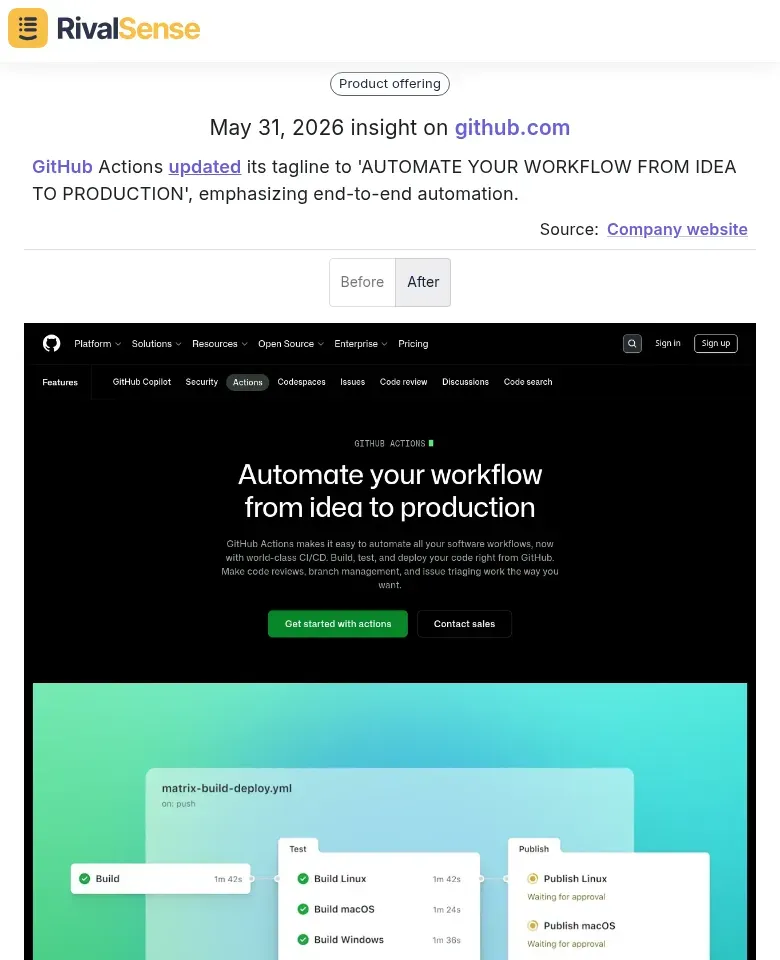
This type of insight matters: a competitor’s refocused narrative can indicate their upcoming product priorities and help you sharpen your own positioning.
Pro tip: Set up a monthly dashboard in your spreadsheet tool to track category counts and engagement averages. A 10%+ shift in any category warrants closer investigation.
🚀 Leverage Insights for Competitive Advantage
Once you’ve tracked key account team members on influencer platforms, turn raw data into strategic action.
1. Feed Competitive Intel Reports
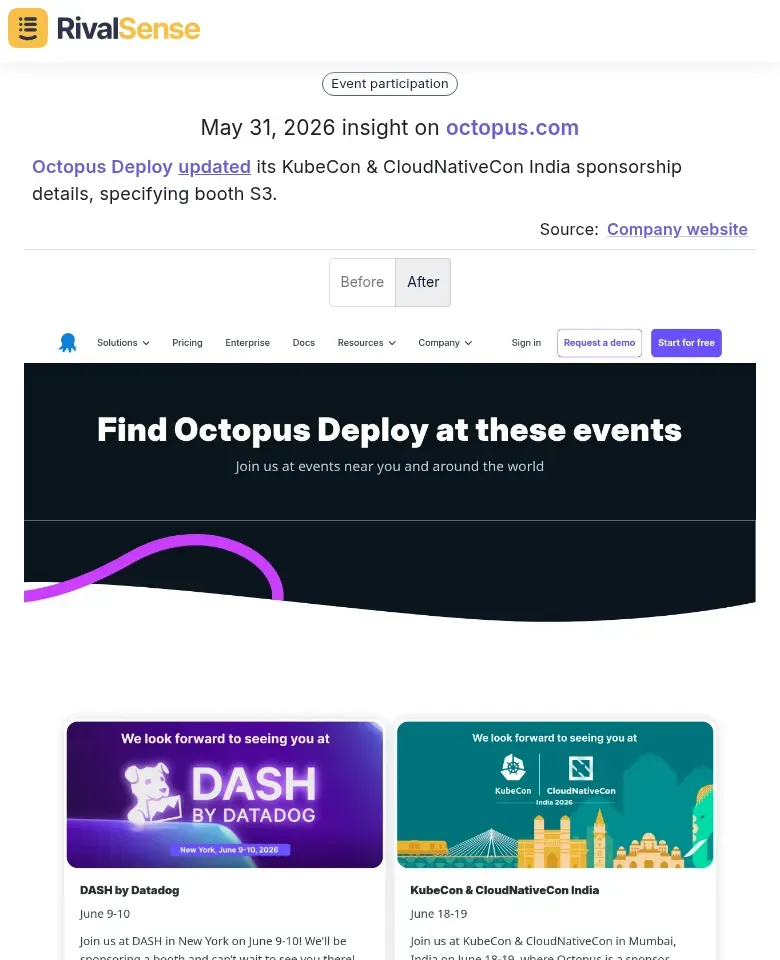
Regularly incorporate findings—e.g., which influencers your rivals’ teams engage, content themes they amplify, and response rates—into your competitive intelligence reports. Share with leadership and strategy teams to inform positioning. Monitor signals like event sponsorships or market expansions for early warning. For instance, RivalSense captured Octopus Deploy specifying booth S3 at KubeCon, and Amazon’s moves—using Japan’s Shinkansen bullet trains for deliveries while launching Alexa+ in France. Such insights, often surfaced from team members’ public posts, are gold for anticipating competitor presence and strategic direction.

2. Benchmark Your Influencer Strategy
Compare your team’s activity against competitors. Identify gaps: Are you missing key voices in your industry? Are competitors leveraging executives as thought leaders more effectively? Create a simple checklist:
- [ ] Number of active team members on LinkedIn/Twitter
- [ ] Posting frequency and engagement metrics
- [ ] Topics and hashtags used
- [ ] Cross-promotion between company and personal accounts
3. Share Actionable Insights with Sales & Product
- Sales: Provide sales teams with competitor team members’ content themes to refine outreach messaging. Example: If a competitor’s CTO posts about AI, your sales team can tailor pitches around your AI differentiators.
- Product: Flag competitor product announcements or customer pain points discussed by their team. Use insights to prioritize features or refine roadmap messaging.
Pro Tip: Create a monthly “Influencer Intelligence” one-pager summarizing top competitor team member moves, key themes, and recommended actions. Distribute to relevant teams to keep insights top-of-mind.
Ready to turn scattered influencer signals into a clear competitive advantage?
Stop manually stitching together LinkedIn, Twitter, and niche platform posts. Try RivalSense for free and get your first competitor report today—delivering all the moves that matter, from event sponsorships to product messaging shifts, in one weekly email.
📚 Read more
👉 How to Spot Competitor Sourcing Pivots (Hint: Bvlgari's Raffia Secret)
👉 How Website Changes Uncover Competitor Financial Insights
👉 The Ultimate Competitor Content Tracking Template
👉 Decoding Competitor Product Moves: A Practical Guide to Key Account Tracking