
Data-Driven Meeting Insights for Monitoring Key Account Growth
Traditional account reviews rely on backward-looking metrics like revenue or renewal rates, which miss the real-time signals that indicate account health. Meeting intelligence fills this gap by analyzing every conversation—calls, demos, check-ins—for patterns that reveal hidden opportunities or risks. For example, a sudden increase in support-related language in sales calls may signal an unresolved product issue that could lead to churn. Conversely, repeated mentions of a new business initiative could uncover an upsell opportunity. To act on this, create a ‘meeting signal taxonomy‘ that tags keywords (e.g., ‘budget,’ ‘competitor,’ ‘timeline’) across your team’s conversations. Then, set up automated alerts for high-risk or high-opportunity phrases. Finally, integrate these signals into a dashboard alongside traditional KPIs. This turns unstructured conversation data into a strategic asset, enabling proactive key account management.
Expanding Data Sources for a Holistic Account View
To build a truly holistic view of key accounts, you must look beyond scheduled meetings. Today’s B2B relationships thrive on mobile, messaging, and phone call interactions—each a goldmine of intent signals and relationship cues. Practical steps:
- Unify communication channels using a meeting intelligence platform that ingests call transcripts, chat logs, and SMS data automatically. Tools like Gong or Chorus can capture these touchpoints.
- Integrate with your CRM (e.g., Salesforce, HubSpot) so every interaction is linked to the account record. Map custom fields for “key topics raised,” “sentiment score,” and “action items” to enrich profiles with context.
- Ensure data consistency by standardizing tags and naming conventions across channels. For instance, flag “budget discussion” in emails, calls, and messages uniformly.
Tip: Create a playbook for reps—when they log a call or text, prompt them to select 3-5 predefined tags (e.g., “competitive mention,” “urgency signal”). This keeps data structured and searchable.
Checklist for completeness:
- [ ] Are all inbound/outbound mobile calls captured?
- [ ] Are messaging apps (Slack, Teams, WhatsApp) integrated?
- [ ] Is there a deduplication rule for overlapping insights?
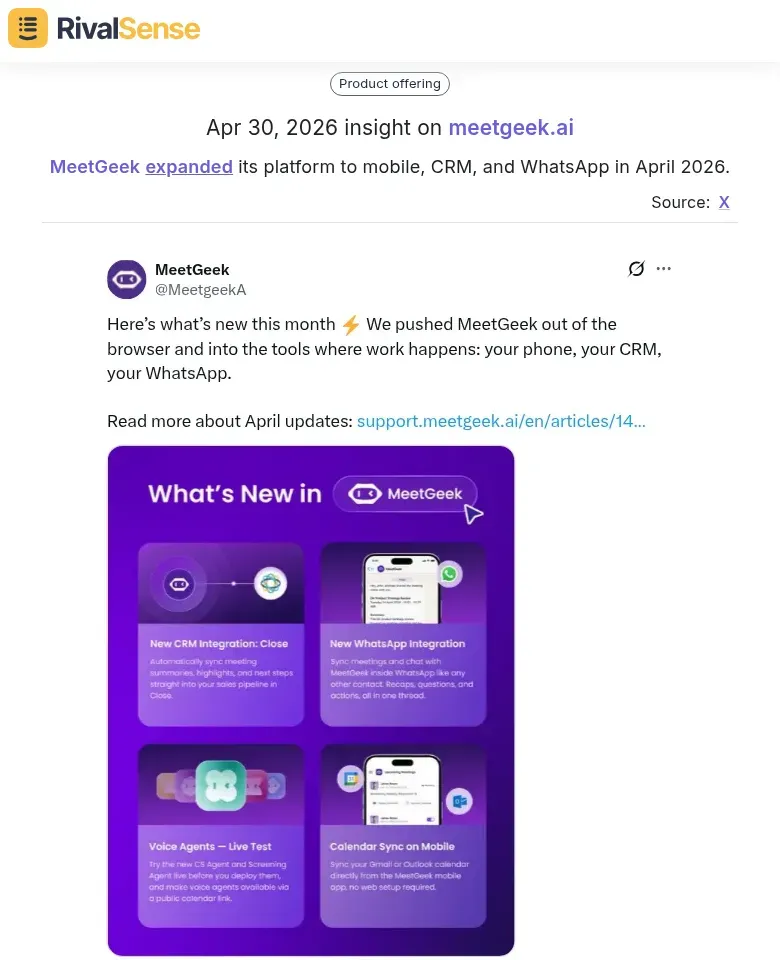
By weaving together every communication thread, you transform fragmented data into a cohesive narrative of account health and growth trajectory. For example, MeetGeek recently expanded its platform to mobile, CRM, and WhatsApp in April 2026. Tracking such expansions through a competitive intelligence tool allows you to assess whether competitors are capturing conversations where your product may be blind. This insight helps you prioritize your own channel integration roadmap.
Automating Insight Capture and CRM Sync
Automating insight capture eliminates the drudgery of manual note-taking and data entry. Instead, use AI-powered meeting tools (e.g., Gong, Chorus, or Otter.ai) to automatically generate structured summaries. Tip: Record all client meetings with permission, then let AI extract action items, decisions, and key account updates.
Real-time CRM sync ensures these insights land directly in your CRM (Salesforce, HubSpot) as structured fields—not messy notes. Set up an integration (via Zapier, native APIs, or tools like Rattle) that pushes meeting outcomes to the relevant Account, Opportunity, or Contact record. Checklist:
- Connect meeting platform to a transcription service.
- Map extracted fields (next steps, risks, sentiment) to CRM custom fields.
- Test with a live meeting to validate accuracy.
Structured data from meetings feeds predictive account scoring models. For example, if a client mentions expanding usage or positive NPS in meetings, your CRM can auto-update a “Growth Signals” score. Action step: Define 3–5 meeting-derived signals (e.g., “Mentioned competitor,” “Asked for ROI proof”) that correlate with expansion, then build a scoring rule in your CRM.
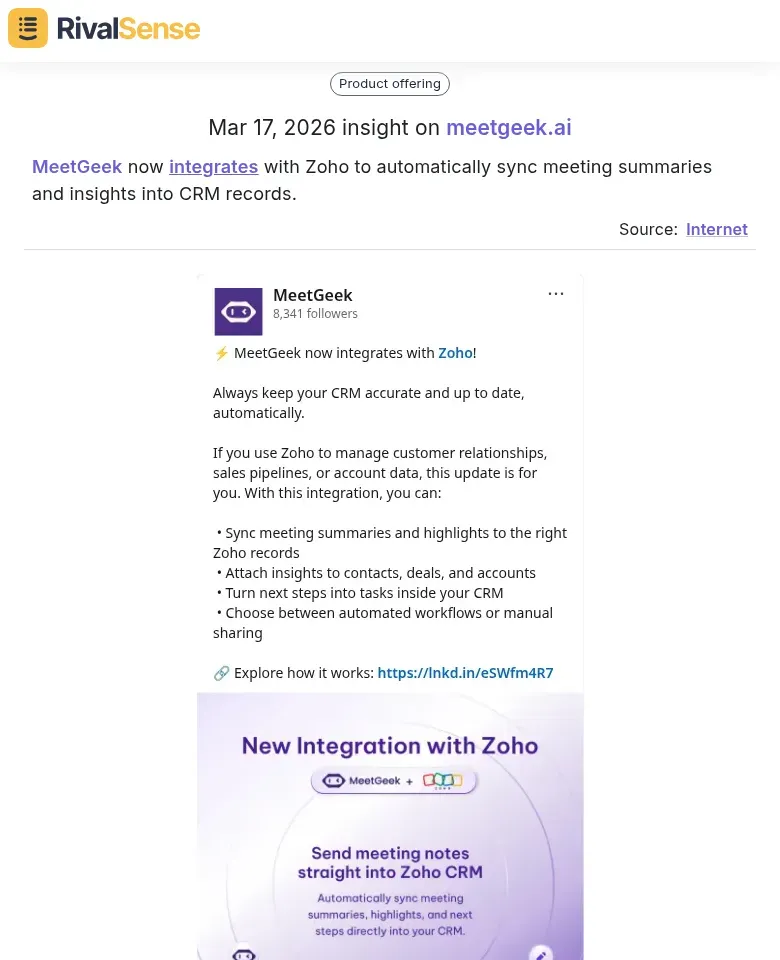
Take MeetGeek’s new integration with Zoho as an example: it automatically syncs meeting summaries and insights into CRM records. Monitoring integrations like this reveals how competitors are deepening their CRM ecosystems—a signal to evaluate your own integrations or leverage similar syncs to delight customers.
By automating capture and sync, your team spends less time typing and more time acting on intelligence that drives key account growth.
Embedding Meeting Insights into Workflow Automation
To accelerate key account growth, don’t let insights sit idle—embed them directly into your workflows. Here’s how to automate the journey from conversation to execution.
Trigger Automated Tasks
- Set up keyword triggers: Use tools like Zapier or Make to monitor meeting transcripts (e.g., via Gong or Chorus). When phrases like “budget approved” or “next steps” appear, automatically create tasks in your CRM (HubSpot, Salesforce).
- Example: When a client says “send me the proposal,” auto-create a task for the account manager with a 24-hour deadline and attach the relevant meeting notes.
Create Documents & Proposals Instantly
- Connect to document generation tools: Link meeting insights to PandaDoc or DocuSign. Extract key decisions (e.g., pricing, timelines) and pre-fill proposal templates.
Checklist:
- Define standard proposal fields (client name, scope, pricing).
- Map meeting transcript highlights to those fields via NLP.
- Trigger generation with a single click from the meeting dashboard.
Build Dynamic Workflows
- Branch based on sentiment: If sentiment analysis shows hesitation, route the lead to a senior sales rep for a follow-up call. If positive, auto-schedule a contract review meeting.
- Tip: Use a simple scoring system (1-5) from meeting insights to decide the next action.
Reduce Friction
- Eliminate manual data entry: Automatically sync action items to project management tools (Asana, Monday.com).
- Practical step: Configure your meeting tool (e.g., Fireflies.ai) to export action items directly to your task list with due dates based on discussed deadlines.
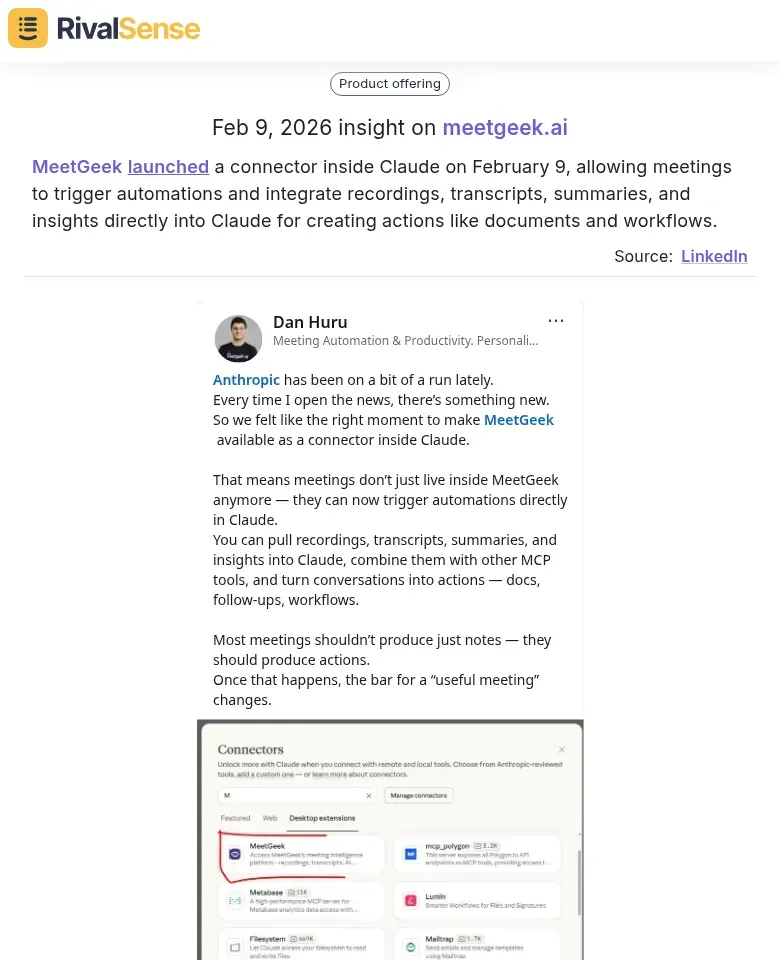
Similarly, MeetGeek’s launch of a connector inside Claude allows meetings to trigger automations and integrate insights directly into the AI assistant for creating documents and workflows. Noticing such partnerships can inspire your own product-roadmap investments or help you anticipate competitor moves that might sway key accounts.
By embedding insights into automation, you cut response times from hours to seconds—directly fueling account growth.
Building a Competitive Intelligence Advantage from Internal Meetings
Internal meetings are a goldmine for competitive intelligence, yet most teams let insights slip away. Here’s how to systematically extract and act on them.
1. Mine Competitor Mentions & Customer Feedback
Record and transcribe all account meetings. Use AI tools to tag mentions of competitors, feature requests, and pain points. Create a shared “Competitor Intel” channel (e.g., Slack) where team members post snippets in real time. Checklist:
- Auto-tag keywords like competitor names, “faster,” “cheaper,” “integrate.”
- Categorize feedback: losing deals, churn risks, feature gaps.
2. Identify Upsell & Cross-Sell Opportunities
Recurring themes signal expansion opportunities. If three customers mention needing analytics, that’s a trigger for your product team. Steps:
- Run monthly sentiment analysis on meeting transcripts.
- Look for “if only [feature] existed” statements.
- Create a “themes heatmap” per account (frequency of topics).
- Alert sales when a theme crosses the threshold (e.g., mentioned by 30% of accounts).
3. Align Teams with Shared Insights
Break silos by feeding meeting insights into a central CI dashboard. Sales sees competitive threats, product sees feature demands, success sees churn signals. Tips:
- Host a weekly 15-min “Meeting Intel Sync” across sales, success, and product.
- Use a shared CRM field: “Competitor Mentioned” + “Theme” for easy filtering.
- Close the loop: when a product team acts on a theme, report back to account teams.
By treating meeting data as a strategic asset, you turn every conversation into a competitive advantage.
Implementing a Data-Driven Meeting Strategy
To maximize meeting insights for account growth, start by selecting tools that integrate seamlessly with your CRM and meeting platforms. Look for solutions offering automated transcription, sentiment analysis, and action-item extraction. Tip: Prioritize tools that support your specific growth objectives—e.g., expansion-focused teams benefit from cross-sell/upsell detection features.
Establish a regular analysis cadence: schedule weekly reviews to identify patterns in customer pain points, product usage, and buying signals. Create a dashboard for key metrics and share summaries with Sales, Customer Success, and Product teams. Checklist:
- Define key questions (e.g., “What blockers prevent expansion?”)
- Tag meetings by account tier and deal stage
- Assign ownership for follow-up actions
Measure ROI by tracking account retention rates, expansion revenue, and win rates before and after implementation. Compare with a control group (accounts without data-driven meetings). Hint: Use a simple ROI formula = (Incremental Revenue – Tool Costs) / Tool Costs × 100. Regularly review and refine your strategy based on these metrics.
To stay on top of competitor shifts like MeetGeek’s channel expansion, new integrations, and AI partnerships, consider using RivalSense. It delivers weekly reports on competitor product updates, pricing changes, event participations, and more—straight to your inbox. Try RivalSense for free today and get your first competitor report to see exactly how your market is moving.
📚 Read more
👉 The Webinar Competitive Intelligence Playbook: Uncover New Features, AI Upgrades & Ecosystem Shifts
👉 How Trimble’s Product Expansion Reveals 3 Competitor Moves You Can Act On Today
👉 The Ultimate Key Account Management Playbook: A 30-Day Plan to Retain & Grow Strategic Accounts
👉 From Reactive to Predictive: A KAM Playbook for Med Equipment CEOs
👉 How Frank Dirksen’s CCO Appointment Revealed Helsing’s Global Expansion Playbook