
A Beginner’s Guide to LinkedIn Competitor Insights for Key Account Managers
LinkedIn offers Key Account Managers (KAMs) a real-time, publicly visible window into competitor activities—often before they appear in press releases or news outlets. By monitoring competitors’ LinkedIn presence, you can detect early signals of strategic shifts: new hiring patterns, product launches, partnership announcements, or changes in company messaging. This proactive intelligence helps you adjust your account strategies swiftly.
How to get started:
- Set up alerts: Use LinkedIn’s notification settings or a competitor tracking tool (e.g., RivalSense) to get notified when a competitor posts or changes their profile.
- Follow key people: Connect with competitor executives, product managers, and sales leaders. Their personal posts, comments, and shared articles often reveal strategic direction before official company pages do.
- Scan Company Pages weekly: Check their 'Recent Updates' and 'Life' tabs for culture shifts or new initiatives.
Three types of insights this guide covers:
- Content & messaging changes – Shifts in value propositions, tone, or target audience.
- Talent moves – New hires, departures, or role changes that signal priorities (e.g., hiring more customer success managers means a focus on retention).
- Engagement patterns – Which posts get the most interaction? What topics resonate? That reveals what their customers care about.
Start with 15 minutes per week per key competitor, and you’ll soon have a treasure trove of actionable intelligence.
🎯 Detecting Competitive Signals from Company Pages and Events
To stay ahead, monitor competitor LinkedIn company pages for event, webinar, and workshop announcements. These reveal strategic priorities—new product launches, target markets, or partnerships.
Practical Steps:
- Follow key competitor pages and turn on notifications (click 'Following' > 'Notifications' > 'All new posts').
- Check their 'Events' tab weekly for upcoming or past sessions.
- Note co-hosted events: a joint webinar with a partner signals aligned capabilities or a push into a new sector (e.g., a CRM platform co-hosting with an AI analytics firm suggests an integrated solution).
- Track attendance or speaker slots at third-party conferences—this highlights thought leadership and network expansion.
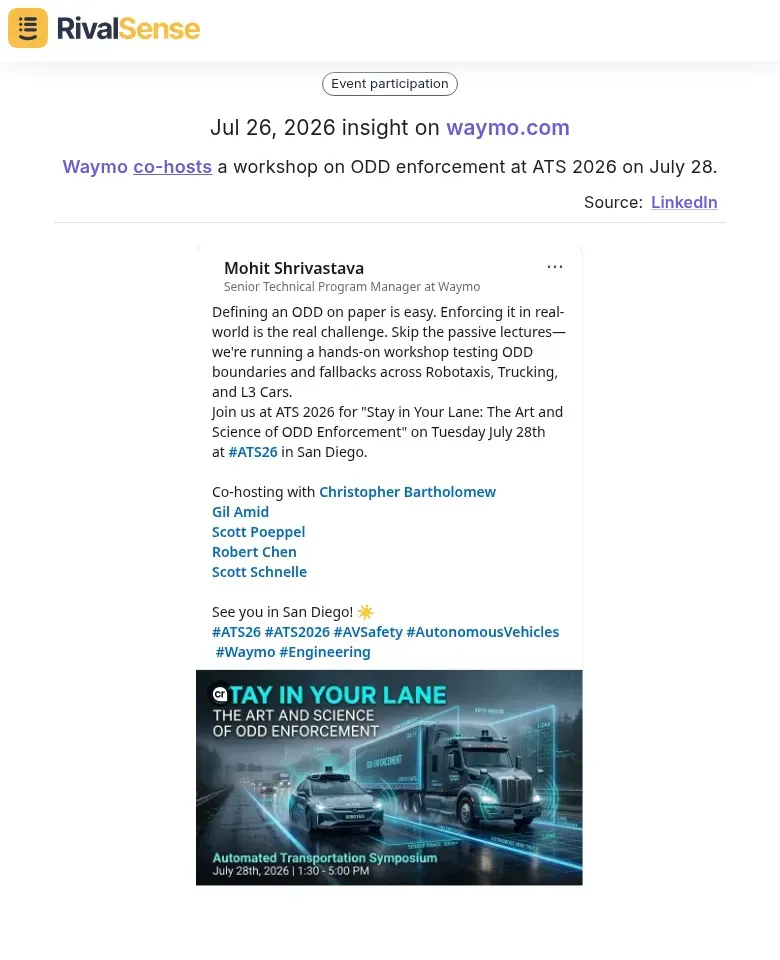
For example, a RivalSense alert recently highlighted that Waymo is co-hosting a workshop on ODD enforcement at ATS 2026 on July 28. This kind of event signal reveals a competitor’s deep focus on a specific technical domain and hints at potential partnership alignments—intel you can use to adjust your account narratives early.
Pro Tips:
- Create a shared spreadsheet listing competitor events, speakers, and partners. Update weekly.
- Set Google Alerts for competitor name + "webinar" or "event invite" to catch LinkedIn posts you might miss.
- Use LinkedIn's 'Notify me' when a company page posts about events—click the bell icon on their page.
By systematizing this, you’ll catch shifts in messaging, new partnerships, and upcoming engagements that impact your key accounts.
🧑💼 Tracking Leadership Hires and Their Implications
When a competitor hires a new CMO, Chief Revenue Officer, or Head of R&D, it’s a signal of strategic shift. A communications hire suggests they’re scaling brand awareness; an R&D hire points to product innovation. Don’t stop at the announcement—dig into the executive’s LinkedIn profile. Where were they before? Did they come from a company known for aggressive sales tactics or one that excelled at customer retention? That past experience often predicts their playbook.
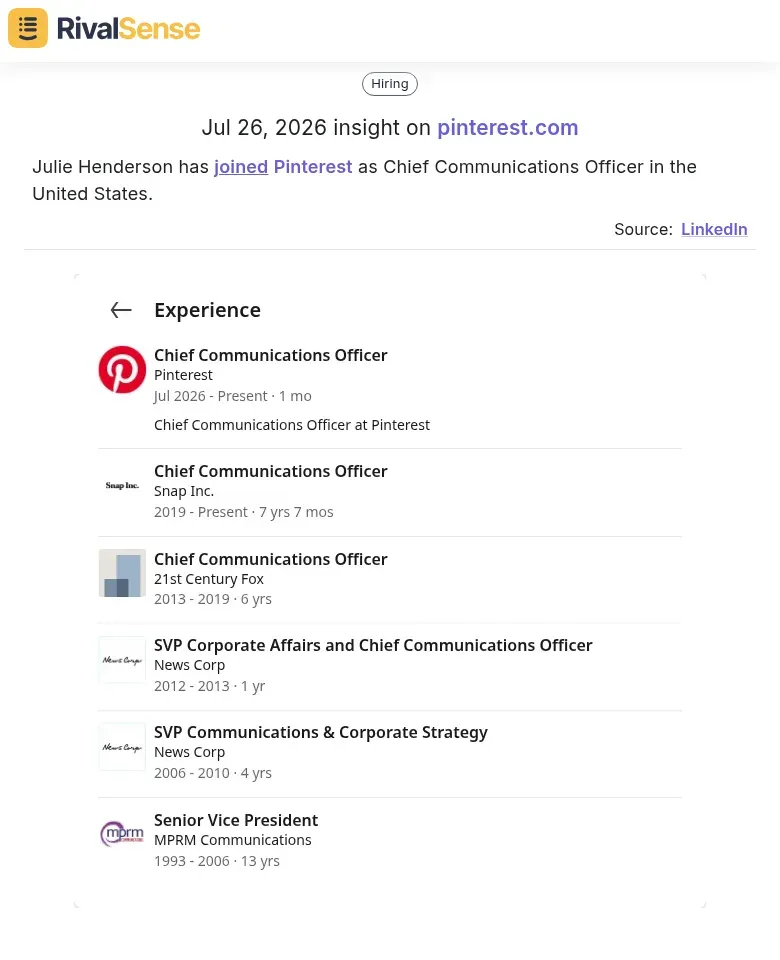
Take the recent move of Julie Henderson joining Pinterest as Chief Communications Officer—a clear sign that Pinterest is investing heavily in corporate narrative and media outreach. Monitoring such hires can alert you to upcoming PR blitzes or messaging shifts that could affect your key accounts.
Actionable steps:
- Set up LinkedIn alerts for “new hire” keywords at your top 5 competitors.
- When a new executive appears, review their “Experience” section for industry shifts, companies they scaled, or crises they managed.
- Update your account relationship map: Who in your organization now needs a connection to this leader? What engagement approach fits their style?
Pro tip: Pair this with competitor job postings. If a VP of Sales just joined and they’re hiring multiple enterprise sales reps, expect a push into your key accounts. Prepare counter-narratives and strengthen your trusted advisor status now.
🔄 Analyzing Role Transitions and Career Moves Between Competitors
When a director-level talent moves from one tech giant to a rival, it’s a loud signal of shifting priorities. For example, a VP of AI leaving Company A for Company B suggests B is doubling down on AI. Track these moves to anticipate product roadmap changes or stealth partnerships.
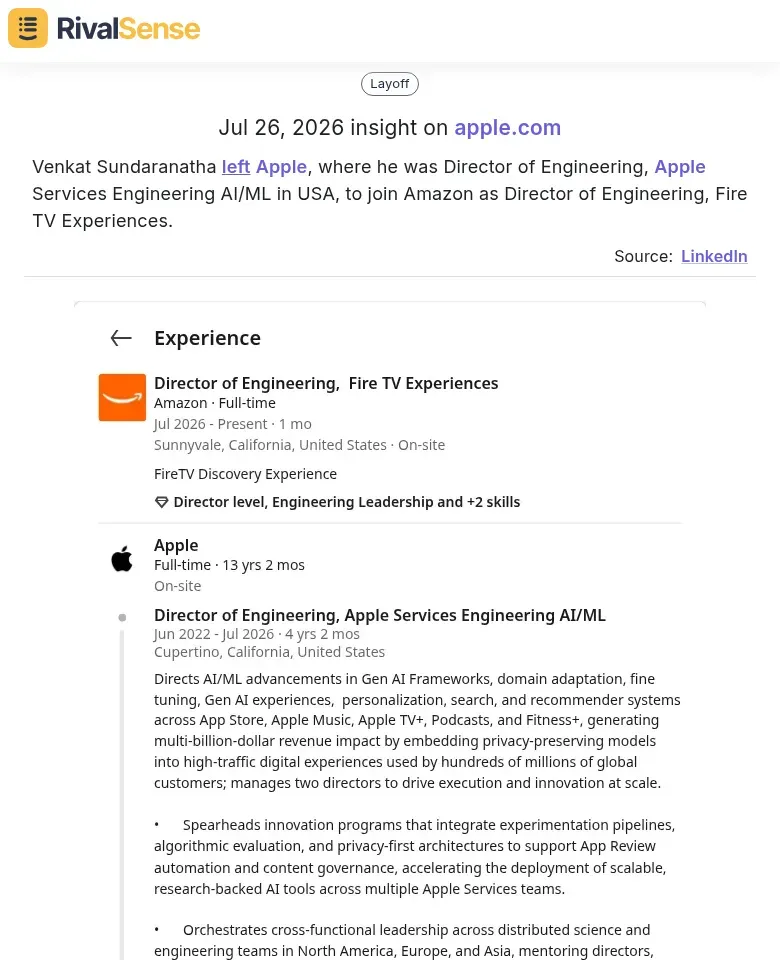
A striking example: a former Director of Engineering in Apple’s AI/ML division recently moved to Amazon as Director of Engineering for Fire TV Experiences. This transition strongly suggests Amazon is accelerating AI integration into its streaming devices, potentially altering the competitive landscape. Tracking such high-level moves helps you anticipate product roadmap shifts and adjust your own innovation positioning.
Practical Steps:
- Set LinkedIn alerts for specific competitor titles (e.g., "Director of Product" at Competitor X).
- Weekly, check "New Hires" and "Role Changes" on competitors’ LinkedIn pages.
- Cross-reference moves with public announcements and new job postings in the same area.
- Use a spreadsheet to log: date, from-company, to-company, role, inferred focus.
Pro Tip: Don’t just track departures; arrivals at your customers or partners can signal new alliance opportunities.
Checklist:
- [ ] Identify top 5 competitors and their key leaders.
- [ ] Set weekly LinkedIn search reminders.
- [ ] Note patterns: multiple execs leaving a competitor for the same rival may indicate team poaching.
- [ ] Correlate move timing with product launches or funding rounds.
This intelligence helps you adjust account strategies—e.g., if a competitor loses its head of partnerships, their partner ecosystem may weaken, opening doors for you.
🧠 Turning LinkedIn Insights into Actionable Account Strategies
Raw LinkedIn data becomes powerful when synthesized into predictive intelligence. Here’s how to transform observations into account-winning moves.
1. Predict Competitor Moves
Combine three data signals:
- Event participation – If a competitor sponsors a conference in your key account’s region, they’re preparing a local push.
- Hiring patterns – A spike in job postings for industry specialists signals an upcoming product launch or market entry.
- Executive transitions – A new VP of Sales from a rival firm often imports their previous playbook.
Checklist for weekly synthesis:
- [ ] Scan competitor LinkedIn events (past and upcoming)
- [ ] Note new hires in strategic functions (sales, product, marketing)
- [ ] Track leadership changes (especially into/out of your accounts)
2. Tailor Account Outreach
Use competitor intel to personalise your messaging:
- If they announced a new product, position your existing solution as more mature or integrated.
- If they have a gap (e.g., no case studies in healthcare), offer to share your healthcare success stories.
Quick tip: Create a “Competitor Initiative Radar” for each key account. Whenever you spot a new competitor initiative, update the account’s touchpoints accordingly.
3. Build a Competitive Response Playbook
Document common competitor patterns and pre-approved counter-arguments.
Steps:
- Identify the top 3 competitor moves that threaten your key accounts.
- For each move, draft a tailored response (e.g., “If Competitor X launches a free tier, emphasize our ROI case studies”).
- Update the playbook monthly with fresh LinkedIn intelligence.
Example entry:
Competitor move: Hires a product marketer focused on mid-market.
Response: Schedule a check-in with your mid-market accounts to reinforce your roadmap and support quality.
By systematically converting LinkedIn signals into tactical actions, you stay ahead—not just informed.
⚙️ Setting Up a Sustainable LinkedIn Monitoring Workflow
To build a sustainable LinkedIn monitoring workflow, start by setting up Saved Searches for key terms like 'competitor product launch' or 'industry trends,' and enable email alerts for real-time updates. For deeper analysis, use third-party tools (e.g., RivalSense, LinkedIn Sales Navigator) to track competitor hiring, content shifts, and engagement patterns—automating data collection so you focus on intelligence, not hunting.
Avoid overload: Limit your focus to the top 5–7 competitors that directly impact your accounts. Create a shared LinkedIn list or folder for each competitor to centralize posts and articles.
Integrate insights into your CRM: Tag competitor mentions, account changes, or strategic moves in your CRM (e.g., Salesforce, HubSpot) using custom fields. This connects competitive intel directly to account planning.
Weekly review cadence: Block 30 minutes every Monday to scan alerts, update CRM notes, and identify 2–3 actionable insights (e.g., a competitor’s leadership change that could open an opportunity).
Pro tip: Use a simple shared spreadsheet with columns for 'Competitor,' 'Signal,' 'Impact,' and 'Action' as a lightweight alternative to full CRM integration for smaller teams.
🤝 Ready to automate competitor monitoring and receive a weekly digest of moves like the ones shown above? Try RivalSense for free and get your first competitor report today: https://rivalsense.co/
📚 Read more
👉 Why Competitor Analysis Matters: A Checklist for Social Media Teams
👉 Competitor Innovation Insights: A Beginner's Guide to Media Mentions
👉 How a Website Page Update Revealed a Competitor's Pivotal Partnership Shift
👉 Competitor Target Audience Analysis: The 2026 Guide to Winning the Right Customers
👉 Workflow Breakdown: Telecom Competitor Market Research Reports