
How to Customize Key Account Tracking for Smarter Competitive Intelligence
Last Updated Jul 3, 2026
Founders and business leaders know that keeping an eye on competitors is essential—but generic competitive monitoring often drowns you in noise. The real value comes from customizing your key account tracking to focus on the moves that actually matter to your business. Whether you're tracking product launches, pricing shifts, leadership changes, or regulatory filings, a tailored approach helps you spot opportunities and threats before they become obvious.
We’ll break down how to customize your key account tracking, what to look for in a tool, and share a practical checklist you can use today.
What Is Key Account Tracking Customization?
Key account tracking customization means configuring your competitive intelligence process—and the tools you use—to monitor only the specific signals, companies, and events that directly impact your strategic decisions. Instead of a firehose of generic updates, you get a curated, actionable weekly report.
For B2B companies, this often means tracking:
- Competitor product launches and feature updates
- Pricing changes and packaging shifts
- Executive hires and departures
- Partnership announcements
- Regulatory changes affecting your industry
- Media mentions and sentiment shifts
- Event participation (conferences, webinars, trade shows)
Customization ensures you’re not wasting time on irrelevant data. It’s the difference between drowning in alerts and having a clear competitive picture.
12 Best Tools for Customizable Competitive Tracking
We’ve organized these tools by business size and need. Each offers a different level of customization for key account tracking.
For Startups and Small Teams
-
RivalSense – RivalSense tracks competitor product launches/updates, pricing changes, event participations, partnerships, regulatory updates, management changes, and media mentions across 80+ sources (company websites, social media, registries, and more). It delivers all insights in a single weekly email report, saving hours of manual research. Customization is built in: you choose which competitors to track and which signals matter most. Paid plans start at a competitive price for the value. Visit RivalSense.io to learn more.
-
Databox – While primarily a KPI dashboard, Databox allows you to pull in competitive data from Google Alerts, social media, and custom APIs. Best for teams already using Databox for internal metrics.
-
Brand24 – A social listening tool that can be customized to track brand mentions, competitor sentiment, and trending topics. Good for media monitoring customization.
For Agencies and Mid-Sized Businesses
-
Klipfolio – Build custom dashboards to visualize competitor data from multiple sources. Flexible but requires some setup. Pricing starts at $120/month.
-
Scoro – Project management with KPI tracking; you can integrate competitor data as custom metrics. Good for teams that want to combine internal and external tracking.
-
Similarweb – Track competitor website traffic, referral sources, and digital strategy. Customize by segmenting traffic sources and geography.
-
Crayon – A dedicated competitive intelligence platform with AI-powered monitoring and customizable alerts. Enterprise-focused.
For Enterprises
-
ThoughtSpot – AI-driven analytics that can ingest competitive data from various sources and surface insights via natural language queries. Customizable Liveboards.
-
Tableau – Visualize competitor data from multiple datasets. Highly customizable but requires technical skills.
-
Microsoft Power BI – Integrate competitive data from APIs and databases. Customizable dashboards and automated alerts.
-
Salesforce – Use CRM data combined with competitive tracking modules to see how competitor moves affect your pipeline.
-
RivalIQ – Tracks competitor social media, content, and digital presence with customizable benchmarking.
Feature Comparison Table of Top Competitive Tracking Tools
| Tool | Starting Price | Key Customization Features | Best For |
|---|---|---|---|
| RivalSense | Contact for pricing | 80+ sources, weekly email reports, choose competitors and signals | B2B companies wanting a hands-off weekly digest |
| Brand24 | $49/month | Custom keywords, sentiment analysis, mentions across web/social | Social listening and media monitoring |
| Similarweb | Contact for pricing | Traffic segments, custom categories, competitive benchmarks | Digital strategy and traffic analysis |
| Crayon | Contact for pricing | AI alerts, battle cards, customizable intent signals | Enterprise competitive intelligence teams |
| Klipfolio | $120/month | Custom dashboards, data blending, hundreds of connectors | Building custom competitive dashboards |
| Tableau | $15/user/month | Unlimited data sources, advanced visualizations, custom metrics | Data-heavy enterprise analysis |
| Power BI | Free plan ($14/user/month Pro) | KPI visuals, scorecards, custom connectors | Microsoft ecosystem users |
Free vs. Paid Competitive Tracking: What’s the Difference?
Free competitive tracking usually means manual work. You can set up Google Alerts, follow competitors on social media, and check their websites. But that approach:
- Misses updates from registries, ad platforms, and less visible sources
- Requires daily manual scanning
- Lacks aggregation—you get alerts scattered across email, RSS, social feeds
Paid platforms like RivalSense automate the collection from 80+ sources, filter out noise, and deliver a curated weekly report. That saves hours per week and ensures you never miss a critical update.
Paid platform advantages:
- Hundreds of sources aggregated in one place
- Customizable alerts by competitor and signal type
- Historical data for trend analysis
- Team sharing and collaboration
- Dedicated support and onboarding
How to Choose the Right Key Account Tracking Customization
Follow this 5-step process to set up a tracking system that delivers real insights.
Step 1: Define Your Competitive Landscape
List your top 5–10 competitors. For each, note what matters most: product updates? Pricing? Leadership? Regulatory? Partnership?
Pro tip: Start with 3 direct competitors and 2 adjacent ones. Expanding later is easier than drowning in data.
Step 2: Identify Key Signals
Not all updates are equal. Define which signals trigger action (e.g., a new feature that matches your roadmap, a price drop on your core product). Use this checklist:
- [ ] Product launch or major update
- [ ] Pricing change (up or down)
- [ ] New partnership or acquisition
- [ ] Key hire or departure (especially in sales, product, or exec roles)
- [ ] Regulatory filing or legal action
- [ ] Major media coverage (positive or negative)
- [ ] Conference or event participation (speaking, sponsoring, exhibiting)
- [ ] Job openings in strategic roles (hints at new initiatives)
Step 3: Choose a Tool That Matches Your Workflow
- Prefer email? Choose a tool that delivers weekly digests (like RivalSense).
- Need dashboards? Look for tools with real-time visualizations.
- Have a small team? Pick one with user roles and sharing.
- Technical team? Consider a tool with API access for custom integrations.
Step 4: Set Up Your Customization Rules
- Define which competitors to track (add/remove as needed)
- Select signal types (e.g., product only, or all)
- Set frequency (daily alerts vs. weekly roundup)
- Add internal tags or notes for team context
Step 5: Review and Refine Monthly
Competitive landscapes change. Schedule a monthly review to:
- Add new competitors
- Remove irrelevant ones
- Adjust signal priorities
- Share insights with your team
Why Customized Key Account Tracking Matters for Your Business
1. Focus on what moves the needle.
Generic tracking floods you with alerts about minor website changes or irrelevant press releases. Customization filters out the noise so you act on what matters.
2. Spot threats earlier.
When a competitor hires a VP of Sales from your industry, that’s a signal they’re ramping up. A customized alert catches this before they take your market share.
3. Find opportunities faster.
A competitor’s product launch that flops? That’s your chance to pivot your messaging. Custom tracking surfaces these moments.
4. Align your team.
When everyone sees the same curated updates, your team stays aligned on competitive strategy—no more “did you see this?” emails.
Real-World Insights from Customized Key Account Tracking
With a tool like RivalSense, your customized weekly report surfaces actionable intelligence like the examples below. Each reveals a different strategic angle you can act on.
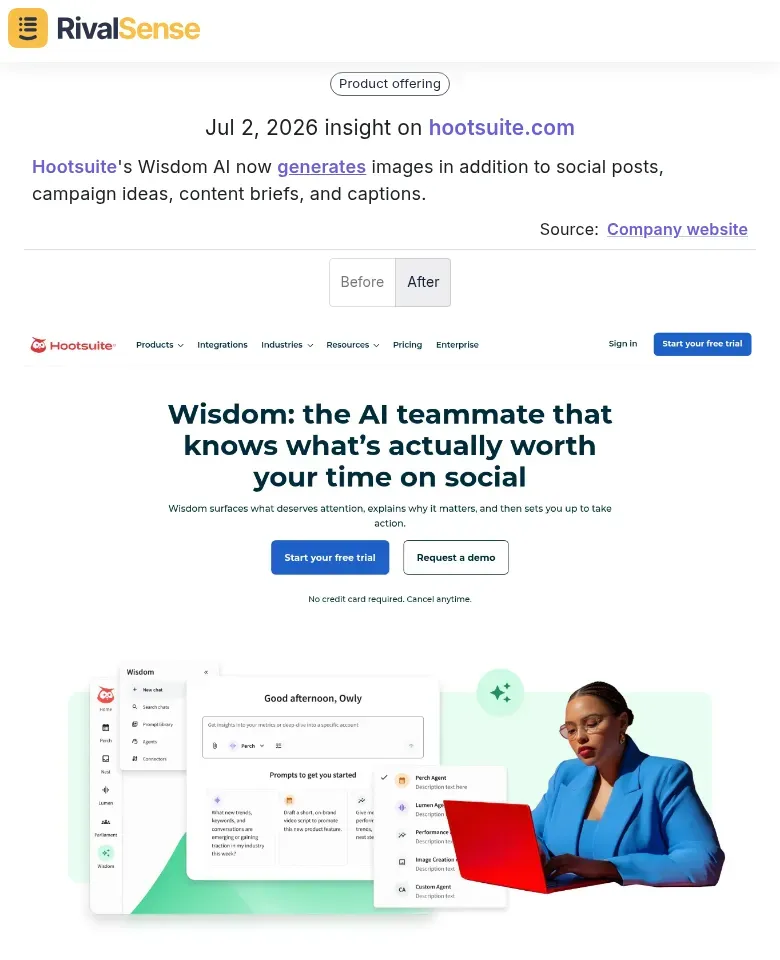
- Product expansion: Hootsuite’s Wisdom AI now generates images in addition to social posts, campaign ideas, content briefs, and captions. This type of product update insight signals a competitor is broadening its feature set—potentially reshaping the market. For B2B teams, it’s an early warning to evaluate your own roadmap and differentiate accordingly.
- Market targeting shifts: Holafly updated its eSIM compatible phones list and revised its destination list to include new regions like Caribbean Cruise, Europe Cruise, Global, Hong Kong, and World Cup 2026™, while removing many individual eSIM destinations. Tracking packaging and geographic changes helps you spot where a competitor is pivoting—ideal for refining your own go‑to‑market strategy or bundling offers in response.
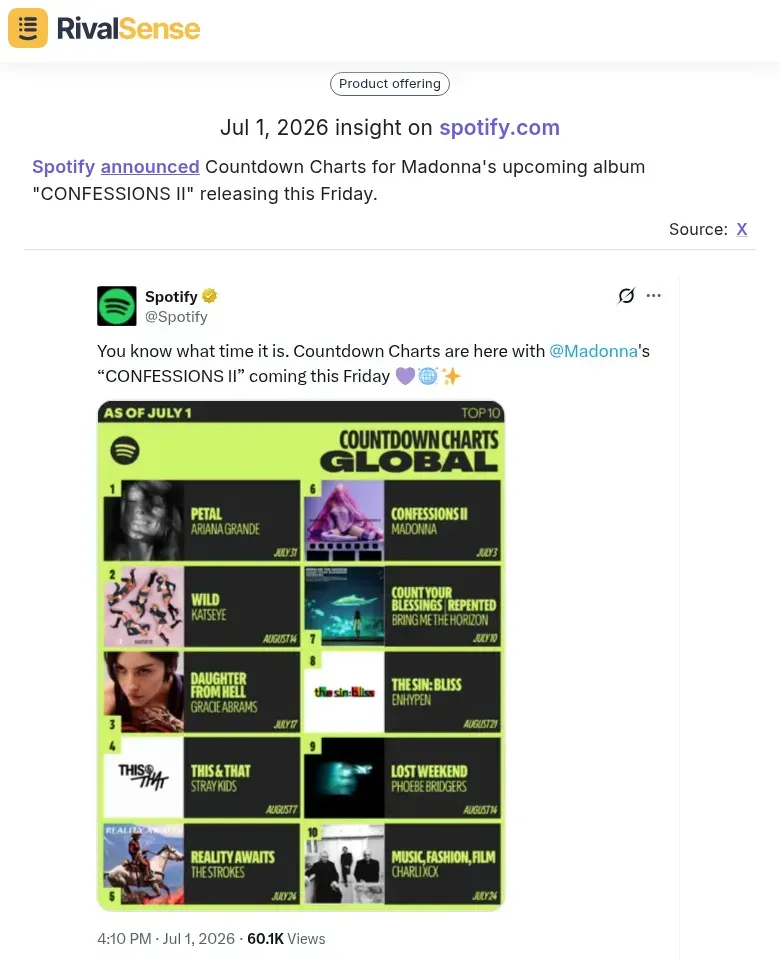
- Partnership and content plays: Spotify announced Countdown Charts for Madonna’s upcoming album “CONFESSIONS II” releasing this Friday. This signals a high‑profile exclusive content partnership aimed at driving user engagement. For B2B organizations in adjacent industries, such partnership announcements can reveal competitive intent and new user acquisition tactics long before they scale.
FAQ About Key Account Tracking Customization
What are the most customizable competitive tracking tools?
RivalSense, Crayon, and Brand24 offer deep customization. RivalSense is particularly strong for B2B teams wanting a simple weekly report without dashboard complexity.
Can I get free competitive tracking?
You can use Google Alerts, manual social media checks, and RSS feeds. But free approaches lack source breadth (no registries, ad platforms, or deep web data) and require manual effort daily.
How often should I review competitor updates?
Weekly is ideal for most B2B companies. Daily alerts can be overwhelming. Monthly may miss important shifts. A weekly curated email (like RivalSense) strikes the right balance.
Do these tools integrate with my CRM?
Some do. RivalSense focuses on email delivery but allows exporting insights. Tools like Crayon and Klipfolio offer CRM integrations. Check your workflow needs.
What’s the difference between competitive tracking and market research?
Competitive tracking is ongoing monitoring of specific competitors. Market research is broader—analyzing entire markets, customer segments, and industry trends. Both are valuable, but tracking is more tactical.
Ready to Streamline Your Competitor Tracking?
Stop manually scanning dozens of sources. With RivalSense, you get customized weekly reports on the competitors you care about—product updates, pricing changes, leadership moves, and more. Try RivalSense for free and get your first competitive intelligence report today.
Skye Schooley contributed to this article. This post was adapted from research on KPI and competitive tracking tools.
Did you find this content helpful?
Yes / No
Share this on: Facebook | Twitter | LinkedIn
📚 Read more
👉 5 Quick Hacks to Track Industry Leaders (and Competitor Moves) for Consulting Success
👉 How Barings Law's No-Fee PCP Model Sparked a Strategic Shift
👉 Predictive LinkedIn Analysis for Key Account Monitoring Wins
👉 Beginner’s Guide: How Transport Competitors Attract Customers
👉 Benchmarking Competitors' Client Partnerships: Trend Insights