
Remote Work Software: Key Account Tracking Automation Trends 2026
The remote work revolution has fundamentally reshaped how businesses manage key accounts. As distributed teams became the norm, traditional account management strategies relying on in-person meetings and office-based coordination became obsolete. This transformation created an urgent need for automated account intelligence systems that could bridge geographical gaps while maintaining competitive advantage.
In 2026, we're seeing three critical trends converge: AI-powered relationship mapping that automatically tracks stakeholder changes across remote organizations, real-time competitive intelligence integration that alerts teams to competitor movements, and predictive analytics that forecast account health based on digital engagement patterns.
Practical steps for implementation:
- ✅ Audit your current account tracking processes for remote work gaps
- ✅ Prioritize automation of stakeholder mapping and relationship tracking
- ✅ Integrate competitive intelligence feeds into your CRM
- ✅ Establish clear metrics for remote account health monitoring
- ✅ Train teams on interpreting automated insights for strategic decisions
Key tip: Start with automating the most time-consuming manual tracking tasks first, then layer in predictive capabilities as your team adapts to the new workflow.
AI-Powered Meeting Intelligence and Account Insights
AI-powered meeting intelligence is revolutionizing key account management in 2026. By automating meeting summarization and extracting actionable insights, teams can focus on strategic decisions rather than administrative tasks. Leading platforms now offer automated meeting summarization that extracts action items, decisions, and key discussion points, saving account managers 8-12 hours weekly.
Practical tip: Implement tools that automatically sync summaries to CRM records, ensuring no critical details slip through. For example, tracking competitor innovations can reveal new approaches. Recently, Roam introduced Magic Minutes templates on February 11, allowing users to customize the structure, tone, and content of meeting summaries based on meeting type.
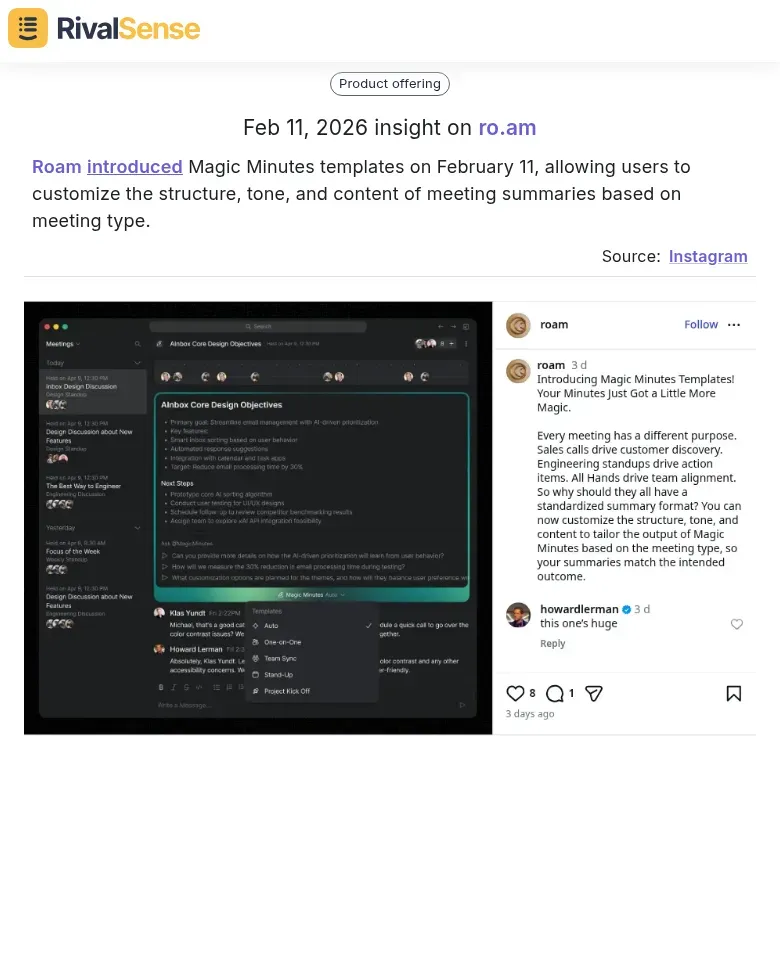
Why this insight matters: Monitoring competitor product launches like this helps you stay ahead by identifying trends in AI-powered meeting tools, which you can adopt or differentiate from in your strategy.
Customizable meeting templates have become essential for different account types and relationship stages. Create templates for quarterly business reviews (QBRs), strategic planning sessions, and renewal discussions.
Checklist for effective templates:
- [ ] Include sections for previous action items
- [ ] Detail current challenges and growth opportunities
- [ ] Outline clear next steps
- [ ] Use AI to analyze past successful meetings for optimization
Pro tip: Use AI to analyze past successful meetings and generate optimized templates automatically.
Real-time AI assistants provide account intelligence during client interactions. These tools analyze conversation patterns, detect sentiment shifts, and surface relevant account history.
Implementation steps:
- Integrate AI assistants with your CRM
- Train models on your account data
- Set up real-time alerts for key triggers
- Establish privacy protocols
Leading companies report 40% improvement in meeting efficiency and 25% better account retention when using these AI-powered insights during live discussions.
Real-Time Collaboration and Decision Automation
In 2026, remote work software is revolutionizing account tracking through real-time collaboration and decision automation. This trend enables distributed teams to make faster, data-driven decisions without geographical constraints. Leading teams now implement automated polling systems that gather team input for strategic account decisions within minutes.
For instance, when a key account shows declining engagement, automated polls to sales, support, and success teams generate consensus-driven action plans. Keeping an eye on competitor features can inform your own development. Roam introduced Polls and On-Air Custom Fields & API on March 4, allowing users to create polls in Group Chats to gather team input and view results.
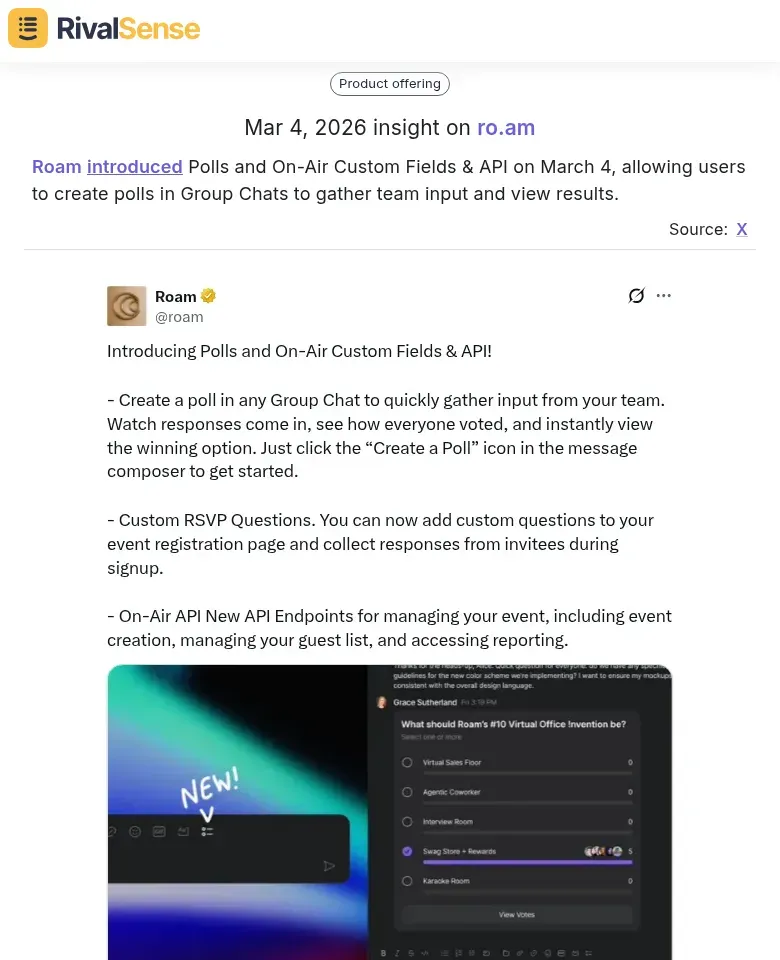
Why this insight matters: Insights into competitor updates like this are valuable for business strategy as they highlight real-time collaboration tools that can enhance your team's decision-making processes.
Custom field tracking has evolved beyond basic metrics to include sophisticated relationship health indicators. Teams now track account-specific KPIs like stakeholder sentiment scores, executive engagement frequency, and solution adoption velocity. These custom fields trigger automated workflows when thresholds are breached, ensuring proactive intervention.
API-driven automation connects account events directly to stakeholder engagement. When a key account achieves a milestone or shows risk signals, APIs automatically trigger personalized communications, schedule executive check-ins, and update CRM records.
Practical implementation steps:
- Integrate polling tools with your CRM for automated decision workflows
- Define 3-5 custom relationship health metrics per account tier
- Set up API webhooks for key account events (contract renewals, usage drops, executive changes)
- Create automated stakeholder engagement sequences triggered by account health scores
- Establish weekly review cadences for automated decision recommendations
Tip: Start with pilot accounts to refine automation rules before scaling across your portfolio.
Predictive Account Health Monitoring and Risk Detection
Predictive account health monitoring is becoming a cornerstone of remote work software in 2026. It leverages AI to forecast risks and opportunities, ensuring proactive account management. Advanced AI now automatically tracks account engagement patterns across multiple touchpoints—product usage frequency, support ticket trends, feature adoption rates, and relationship signals like executive meeting attendance and contract renewal discussions.
Practical Implementation Checklist:
- [ ] Integrate AI-driven predictive scoring that analyzes historical data to forecast retention risks and expansion opportunities
- [ ] Set up real-time alerting systems that trigger when engagement drops below defined thresholds
- [ ] Create intervention workflows for different risk levels (low, medium, high)
- [ ] Establish escalation protocols for critical account health deterioration
- [ ] Monitor leading indicators like decreased login frequency, reduced collaboration tool usage, or declining meeting participation
AI models now assign predictive scores (0-100) that identify at-risk accounts 60-90 days before potential churn, while flagging expansion opportunities based on usage patterns exceeding current license limits. Real-time dashboards provide instant visibility into account health, with automated alerts sent to customer success teams when intervention is needed. The most advanced systems even suggest specific actions—from personalized check-in emails to executive business reviews—based on the detected risk patterns.
Pro Tip: Start by tracking 3-5 key engagement metrics specific to your remote work platform, then gradually expand monitoring as your AI models mature. Focus on actionable insights rather than overwhelming data collection.
Integration Ecosystems and Cross-Platform Account Intelligence
In 2026, remote work software integration ecosystems are evolving beyond basic API connections to create intelligent cross-platform account intelligence systems. These ecosystems facilitate seamless data flow between tools, providing a holistic view of account interactions. Leading companies are implementing seamless API connections between remote work tools (Slack, Teams, Zoom) and CRM/account management systems (Salesforce, HubSpot) that automatically sync meeting notes, communication patterns, and engagement metrics directly into account profiles.
Practical implementation steps:
- Audit your current remote work stack and identify key data sources
- Prioritize API integrations that capture relationship signals (meeting frequency, response times, collaboration patterns)
- Implement automated data synchronization workflows that update account records in real-time
- Create unified account dashboards accessible across distributed teams
For enhanced account research, forward-thinking organizations are enabling personal access integration for AI assistants. This allows AI tools to analyze historical communications, identify decision-making patterns, and prepare personalized outreach strategies based on actual interaction history. The key is establishing secure, permission-based access controls while maintaining data privacy compliance.
Example from the market: Roam introduced a new On-Air API for creating events, managing guest lists, tracking RSVPs, and monitoring attendance, and added support for personal access to connect AI assistants like Claude or ChatGPT for meeting summaries and personal message management.
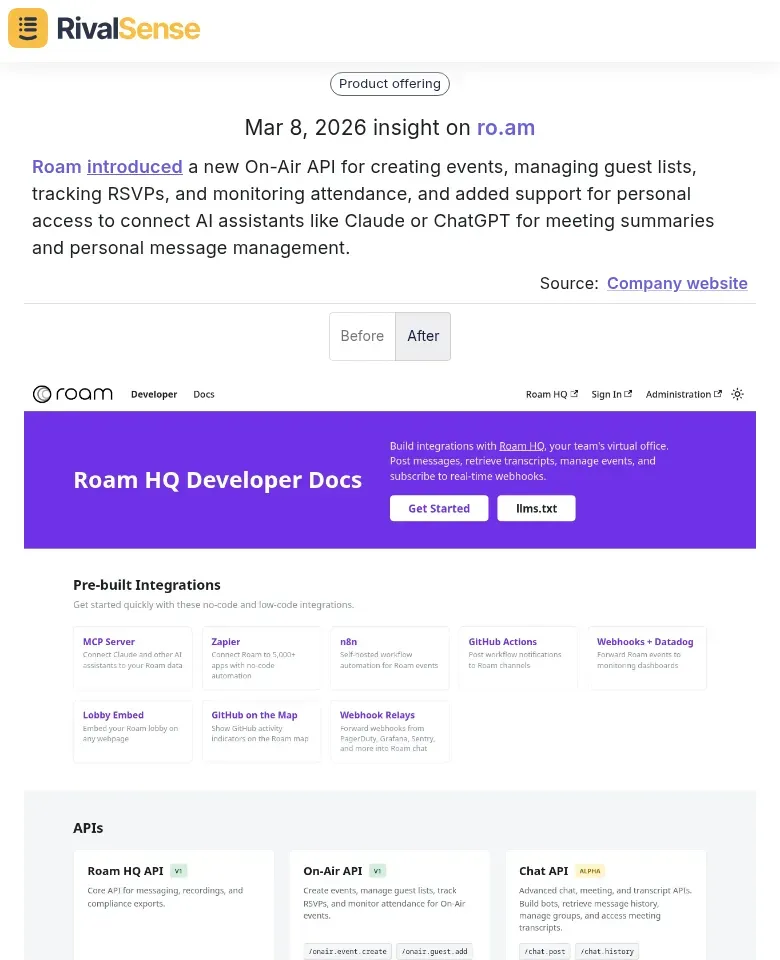
Why this insight matters: Tracking competitor API developments and integrations is crucial for business strategy, as it reveals how platforms are evolving to support connected ecosystems, which you can benchmark against your own integration roadmap.
Pro tip: Start with pilot integrations between your primary communication platform and CRM, focusing on automating the capture of key relationship indicators rather than trying to sync everything at once.
Future Outlook: Autonomous Account Management in 2026 and Beyond
As we look toward 2026, autonomous account management is poised to transform remote work software. Agentic AI systems are evolving beyond passive tracking to proactively manage account relationships—predicting churn risks, identifying upsell opportunities, and automating personalized engagement. This shift from reactive monitoring to predictive automation enables remote-first organizations to maintain competitive edges in dynamic markets.
Key trends include:
- 🔍 AI-driven sentiment analysis of customer communications to flag at-risk accounts
- 🤖 Automated outreach sequences triggered by usage patterns or milestone achievements
- 📊 Integration of competitive intelligence data to benchmark account health against industry standards
Strategic implications for leaders:
- Audit your current tech stack for AI-ready CRM and customer success platforms
- Pilot predictive scoring models on a subset of high-value accounts
- Establish clear governance protocols for AI-initiated customer interactions
- Train teams to interpret AI insights and intervene when human touch is critical
Practical checklist:
- [ ] Map customer journey stages to potential AI intervention points
- [ ] Define success metrics for autonomous engagement (e.g., reduced response time, increased retention)
- [ ] Implement feedback loops to continuously refine AI predictions
- [ ] Ensure compliance with data privacy regulations in automated communications
By 2026, organizations that harness these trends will not only track accounts but actively nurture them—turning competitive intelligence into sustained growth.
Putting It All Together: Leveraging Competitor Insights for Strategy
To stay ahead in the rapidly evolving remote work software landscape, it's essential to monitor competitor movements and industry trends. The examples highlighted above, such as Roam's innovations in meeting templates, polls, and APIs, demonstrate how tracking competitor product launches can inform your own strategy—whether by adopting similar features, differentiating your offerings, or identifying gaps in the market.
Why competitor tracking matters:
- 🚀 Product Launches: Keep pace with innovation and avoid being left behind.
- 💡 Feature Updates: Understand what users value and adapt your roadmap.
- 🔗 Integration Developments: Ensure your ecosystem remains competitive and connected.
For founders, business owners, entrepreneurs, and CEOs of B2B companies, automating account tracking is no longer optional—it's a strategic imperative. By implementing the trends and tips discussed, you can enhance account management, reduce churn, and drive growth.
Ready to automate your competitor tracking? Tools like RivalSense can help by delivering weekly reports on competitor product launches, pricing updates, event participations, partnerships, and more—all directly to your inbox. This allows you to focus on strategy while staying informed about market movements.
👉 Try RivalSense for free today at https://rivalsense.co/ and get your first competitor report to start gaining actionable insights for your business strategy.
📚 Read more
👉 Solving Regulatory Compliance Gaps: How Competitor Insights Drive Proactive Account Management
👉 How to Decode Competitor Moves from Event Announcements: A DataDome Case Study
👉 The Strategic Guide to Tracking Key Account Milestones for B2B Leaders
👉 Mastering Key Account Management with Commercial Banks for B2B Companies
👉 How RivalSense Alerted Competitors to CrowdStrike's Browser Extension Control